The post New battery saver in Opera extends battery life and reduces laptop overheating appeared first on Core Sector Communique.
]]>June 8, 2016
A new battery saver feature is ready today in Opera for computers. Test results show that, once enabled, it extends a laptop’s battery life by up to 50%, while keeping the laptop cooler. Reducing overheating is especially important during the summer months when people travel with their laptops.
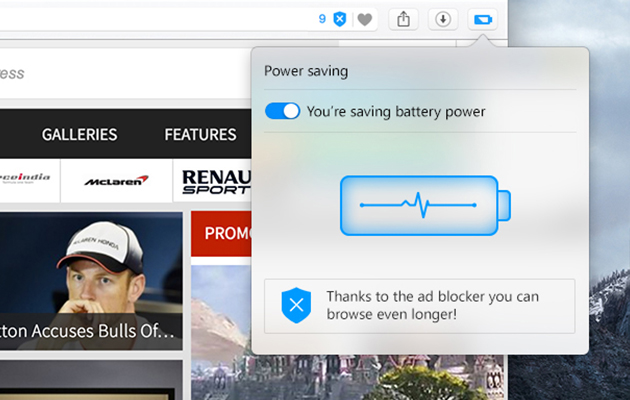
The new battery savings are possible thanks to various optimizations, such as reducing non-essential system tasks like background tabs and other browser activities, while still providing a fast browsing experience.
We achieve these power savings by:
- Reduced activity in background tabs
- Waking CPU less often due to more optimal scheduling of JavaScript timers
- Automatically pausing unused plug-ins
- Reduced frame rate to 30 frames per second
- Tuning video-playback parameters and forcing usage of hardware accelerated video codecs
- Paused animations of browser themes
Up to 50% longer battery life
According to our tests, the latest Opera with battery saver and ad blocker enabled was able to run up to 50% longer than browsers like Google Chrome on a laptop running Windows 10, 64-bit. Go to our blog post to learn more about this test and methodology.
Battery saver reduces laptop overheating
Watching videos, reading news and staying social during the summer not only eats through a laptop’s battery, but makes it really warm. Test results with the new battery saver enabled show that Opera will keep laptops more than 3 degrees C cooler.
How it works
Using the battery saver is easy. As soon as the laptop’s power cable is unplugged, the battery icon will appear next to the search and address field in the Opera browser. Click the battery icon to activate the power saving mode and flip the switch. The browser will also suggest you enable power saving mode when your laptop reaches 20% remaining battery capacity.
Download Opera for computers here.
Read more about this release in our blog post.
About Opera
Opera enables more than 350 million internet consumers worldwide to connect with the content and services that matter most to them. Opera also helps publishers monetize their content through advertising and advertisers reach the audiences that build value for their businesses, capitalizing on a global consumer audience reach that exceeds 1 billion.
Opera and O logo are trademarks of Opera Software AS.
The post New battery saver in Opera extends battery life and reduces laptop overheating appeared first on Core Sector Communique.
]]>